
LITPro - GPS Lap Timer
NZN Labs Inc.Sports
4.511.00 Reviews
- Version
- 3.13.35
- Installs
- 10.00K
- Age Rating
- Everyone
Screenshots

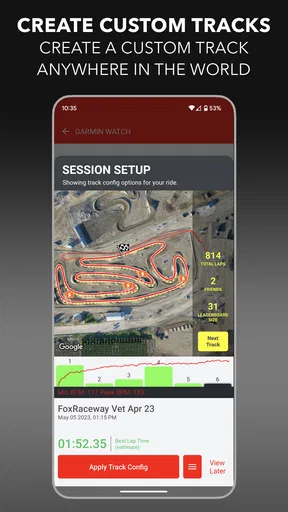
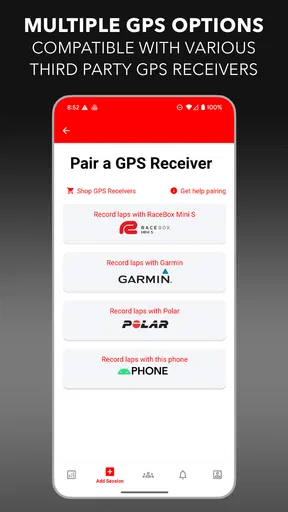
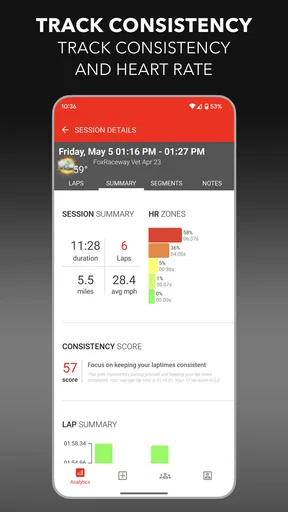
Our Review of LITPro - GPS Lap Timer
 Analysis by Appyee
If you ride on a circuit and want something more useful than simply guessing whether a lap felt quicker, LITPro - GPS Lap Timer is worth a look. I found its appeal in the way it turns an Android phone into a focused riding companion: it tracks laps through GPS and gives you a way to think about your riding beyond a single stopwatch result. It is a sports app from NZN Labs Inc., available free of charge, with optional purchases priced from $4.99 to $11.99 per item.
I would not describe it as a complete replacement for dedicated track hardware. A phone still depends on its position, battery, mounting, and the conditions around it. However, for someone trying to learn a circuit, compare sessions, or build a more deliberate practice routine without buying specialized equipment immediately, it offers a practical starting point. The important thing is to approach it as a GPS lap timer and personal riding coach, not as a magic button that automatically fixes technique.
Getting from installation to a useful first session
I’d use the first outing to check the whole routine, not just whether a lap time appears: get the phone ready while stopped, complete a familiar lap, then review the result somewhere safe. That gives me a chance to spot practical snags—such as an awkward mount or an unclear recording state—before they matter on a busier session.
What to expect before you ride
The first thing I would keep in mind is that this is a riding tool, not a general sports tracker with a little lap functionality added on. Its central idea is the relationship between your location and the circuit. That makes it most relevant to track-day riders, motorcyclists practicing on a known course, and anyone who wants a clearer record of progress from one session to the next.
That focus also explains when it may feel less useful. If you mainly ride on public roads, take relaxed weekend trips, or want turn-by-turn navigation, a conventional navigation app or a broader cycling and fitness tracker may suit you better. LITPro is built around the question, “How did this lap compare with the previous one?” It is not primarily about getting you from one address to another.
The app is rated for Everyone, which makes it approachable from an age-rating perspective, but that should not be confused with a recommendation to use a phone while actively riding. I would set everything up before moving, mount the device securely, and treat the display as something to inspect only when stopped. The safest benefit comes from reviewing your session afterward rather than trying to operate the app at speed.
Its public reception is encouraging without being overwhelming: it holds a 4.5 average from around 149 ratings, with 11 written reviews. I read that as a useful sign that the core concept works for a meaningful group of riders, while also remembering that a relatively small review pool cannot tell every rider how the app will behave on every phone, track, or mounting position.
Preparing the phone before the first outing
My advice is to do the initial setup at home or in the paddock, not in the minutes before a session begins. Install the current version, which is 3.13.35, on an Android device running at least version 8.0, then open the app while you have time to understand its screens. This simple preparation prevents the most common beginner mistake: trying to learn the interface while wearing gloves and preparing to ride.
Think about the physical side as carefully as the software side. A phone that moves in its mount can make the experience frustrating, even if the app itself is working correctly. I would use a secure mount, check that the screen remains visible only if you genuinely need it, and make sure the phone has enough charge for the whole outing. GPS use can be demanding, and a session that ends because the phone runs low is not very helpful for later comparison.
Before leaving the pits, confirm that the app is ready to record and that the circuit or riding area is represented in the way you expect. Do not assume that opening an app automatically means a meaningful lap has already been captured. The first success depends on starting from a sensible position, allowing the phone to establish its location, and giving the system a clean opportunity to recognize the course.
A useful preparation habit is to create a short checklist: phone charged, mount firm, location active, app open, and recording state understood. That may sound obvious, but it matters more here than with a casual fitness app. A lap timer is only valuable when the recording begins at the right moment and continues consistently enough to compare one attempt with another.
Your first successful action
For a first session, I would not chase a personal best. The better goal is to complete one clean lap and confirm that the app is recording the activity in a way you can review later. Choose a familiar pace, avoid changing several variables at once, and concentrate on finishing the lap rather than constantly checking the phone.
Once you are back in a safe place, look at the recorded result and ask a few practical questions. Did the lap begin and end where you expected? Does the result look plausible compared with your own sense of the session? Did the phone remain firmly positioned? Were there any moments where the GPS behavior seemed inconsistent? These checks tell you more than one impressive-looking time.
The personal-coach idea becomes more useful when you turn a result into a repeatable process. On the next session, keep your riding line and pace reasonably consistent, then compare the outcome with the earlier attempt. If you change tires, setup, weather, or riding style at the same time, it becomes harder to know what caused a difference. I see LITPro as most valuable when it supports controlled experimentation rather than random score chasing.
Here is a realistic example. Imagine arriving at a circuit for a short evening practice session with only a few opportunities to ride. On the first run, you use the app simply to establish a baseline. After stopping, you notice that your time is not the only useful result: you can also reflect on where the lap felt hesitant and whether the next run was smoother. You then repeat the same broad approach rather than attempting an entirely different style. Even without expensive equipment, that creates a more disciplined feedback loop.
The first meaningful success is not the fastest number; it is a reliable comparison you can learn from. That distinction prevents disappointment and makes the app easier to use. GPS timing can provide direction, but your riding judgment remains essential.
Where beginners may become confused
The most likely confusion is expecting GPS to behave like a highly specialized timing transponder. A smartphone estimates position, and that position can be affected by the environment, the device, and the quality of the signal. I would therefore treat small differences cautiously. If two laps appear almost identical, that may be more meaningful than celebrating a tiny change that falls within normal tracking uncertainty.
Another point that deserves attention is the difference between recording and coaching. The app can help organize your understanding of a ride, but it cannot see every detail of body position, braking technique, throttle control, or traffic around you. When a lap improves, I would still ask what changed in my behavior. When it gets worse, I would avoid blaming the software immediately and consider fatigue, conditions, or an inconsistent line.
New users may also wonder whether they need to purchase anything before the app becomes useful. The app itself is free, while optional in-app items range from $4.99 to $11.99 each. I would begin with the free experience and decide only afterward whether an optional purchase addresses a real need in your workflow. Paying before understanding how you ride and review sessions can lead to spending without gaining better habits.
There is also a practical difference between using a phone as a recording device and using it as a live display. A live screen can be distracting, especially on a motorcycle. I prefer to minimize interaction during the lap and do the thoughtful work afterward. If you are looking for constant on-track visual coaching, you should carefully consider whether that style is safe and whether a dedicated device would be a better fit.
The app’s install base is over 10K, which suggests it has reached beyond a tiny experimental audience, but it is still not something I would assume every riding instructor or track organizer supports. If you attend an organized event, check the event’s own rules about mounted phones and recording equipment. The app can be technically suitable while the venue’s safety policy says otherwise.
Using the results without fooling yourself
One of the more useful ways to work with a lap timer is to separate data collection from interpretation. During the ride, collect the session. Afterward, write down what you remember while the sensations are still fresh: where you felt smooth, where you hesitated, and whether traffic or an interruption affected the attempt. Then compare the app’s result with your notes.
This approach helps avoid a common trap in performance apps: treating one number as the entire story. A slower lap may actually be a better learning lap if you used a safer line or practiced a difficult corner deliberately. A quicker lap may not represent genuine improvement if the conditions were different or the run was less controlled. LITPro becomes a better coach when you supply that context yourself.
I would also establish a consistent naming or note-taking routine if the app allows you to organize sessions in a way that makes sense to you. Use simple descriptions such as “baseline,” “smooth line,” or “late braking practice,” rather than relying on memory. The value of a session often appears later, when you want to understand why one result changed.
For riders who attend occasional track days, this can make the app especially useful. You can approach each outing with one question instead of trying to improve everything at once. For example, focus on maintaining a calmer entry into a corner, then compare the overall result only after the session. That is a more sensible use of a GPS timer than staring at every fluctuation.
How it compares with the usual alternatives
The obvious alternative is a basic stopwatch. A stopwatch is cheaper, simpler, and less dependent on a phone’s location, but it usually gives you less relationship between the lap and the route. It can tell you how long something took; LITPro is aimed at connecting that time with repeated movement around a circuit.
Another alternative is dedicated lap-timing hardware. Specialized equipment may offer stronger consistency, clearer controls, or a design made specifically for motorsport use. If you compete seriously, need dependable timing under demanding conditions, or already know that you want advanced hardware, buying a dedicated unit may be the better long-term decision. The trade-off is cost and the need to carry another device.
General fitness apps sit in a different place. They are often better for broad activities, health trends, route recording, or sharing ordinary workouts. LITPro makes more sense when the circuit itself is the center of attention. I would choose it over a general tracker for repeated laps, but not necessarily for a mixed week of running, commuting, and casual outdoor exercise.
The strongest case for this app is therefore convenience. Many riders already carry a smartphone, and a free starting point lowers the barrier to trying structured lap review. The weakest case is precision-critical use where a phone-based system may not satisfy your expectations. Knowing which side of that line you occupy is more important than any rating.
Who should try it, and who should skip it
I would recommend LITPro to a first-time track-day rider who wants more structure than memory can provide, an experienced rider testing a training idea, or someone who wants to explore lap timing before investing in dedicated equipment. It is also a reasonable choice for riders who enjoy reviewing their progress and are willing to treat the results as guidance rather than absolute truth.
I would skip it if your main need is road navigation, if you dislike setting up a phone before every ride, or if you require professional-grade timing consistency. I would also avoid making it your only source of feedback if you are working on technique that requires an instructor’s eyes. The app can show that something changed; it cannot fully explain your posture, line choice, or decision-making.
For a first-time user, the reassuring part is that you do not need to begin with a complicated training plan. Start by completing one clean recorded lap, review it while stopped, and repeat the process on another session. If that workflow feels useful, gradually make your comparisons more intentional. If it feels like more equipment management than benefit, a simple stopwatch or an instructor may serve you better.
My next-step routine
After the first successful session, I would choose one improvement target for the next outing and keep the rest of the setup as consistent as possible. Do not turn every ride into a test of maximum speed. Use the app to build awareness: establish a baseline, repeat a comparable run, and review the result alongside your own notes.
It is also worth deciding how much of the app you genuinely need before considering an optional purchase. The free entry point is enough to evaluate whether GPS lap timing fits your habits. If you find yourself using it regularly and a paid item clearly supports your chosen workflow, the purchase may be easier to justify. If you rarely ride circuits, spending more is unlikely to transform the experience.
Overall, I see this sports app as a sensible bridge between a handheld stopwatch and dedicated track equipment. It is free to start, rated Everyone, and maintained by NZN Labs Inc. for Android devices running from version 8.0 onward. Its 4.5 average and over 10K installs show that it has found an audience, but the real test is personal: can it help you make repeatable comparisons without distracting you from riding safely?
For me, the answer is yes, provided expectations stay realistic. LITPro is most convincing when I use it after the ride as a calm review tool, not as an excuse to chase every tiny timing change. If you want a phone-based way to begin learning from your laps, it is worth trying. If you need certified precision, live professional coaching, or ordinary road-navigation features, I would choose a different solution.
Verdict
Strengths of LITPro - GPS Lap Timer
- Accurate GPS tracking helps measure laps without extra trackside hardware.
- Supports detailed performance analysis for training and race preparation.
- Useful for comparing lap times across different sessions.
- Can help identify consistency issues during repeated laps.
- Designed for drivers who want motorsport-focused timing tools.
Limitations of LITPro - GPS Lap Timer
- GPS accuracy may drop near buildings, trees, or in poor-signal areas.
- Continuous location tracking can noticeably reduce battery life.
- The interface may feel complex for beginners unfamiliar with lap timing.
- Advanced features may require extra setup before driving.
- Results can vary depending on phone placement and mounting stability.
Similar Picks in This Category
View All
BeSoccer: Soccer Live Score
BeSoccer apps4.3

Cricbuzz - Live Cricket Scores
Cricbuzz.com3.7

NFL
NFL Enterprises LLC2.4

Da Fit
MO YOUNG LIMITED3.6

ESPN
Disney4.5

LiveScore: Live Sports Scores
LiveScore Limited4.5
Frequently Asked Questions
What is LITPro - GPS Lap Timer used for?
LITPro - GPS Lap Timer is designed for riders and drivers who want to record, analyze, and improve their performance on a track or route. It uses GPS data to measure lap times, sector performance, speed, distance, and consistency. The app is particularly useful for motocross, karting, racing, and other motorsports where comparing laps and identifying areas for improvement is important.
Does LITPro work without a dedicated LITPro device or subscription?
The app’s available features may depend on the LITPro hardware, account type, and subscription plan. Basic installation and account access do not necessarily provide every tracking or analysis function on their own. Before downloading, users should check the current compatibility requirements, supported devices, and pricing details in the official app listing, because hardware bundles and premium services can change over time.
How accurate is the GPS lap timing?
LITPro relies on GPS positioning, so its accuracy can vary according to the phone or connected device, satellite reception, weather, track layout, and surrounding buildings or trees. In open areas, it can provide useful lap and speed comparisons, but it should not be treated as a professional transponder replacement in every situation. Users should allow GPS access and maintain a clear view of the sky.
Can I review and compare my laps after riding?
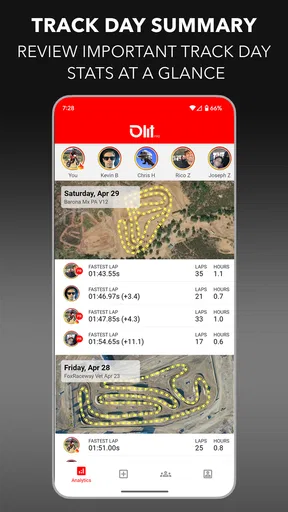
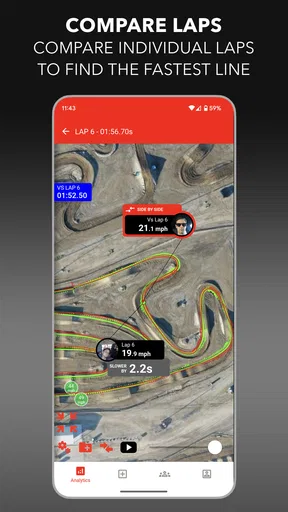
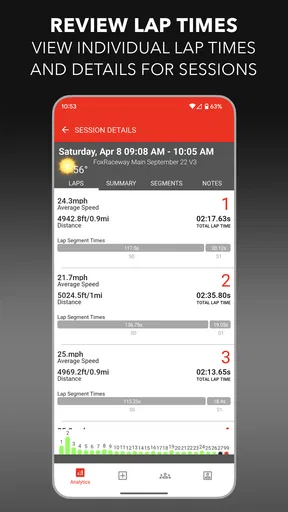
Yes, one of the app’s main advantages is the ability to review recorded sessions rather than relying only on the live lap display. Depending on the supported setup and plan, riders can examine lap times, speed patterns, sectors, consistency, and other performance data. Comparing faster and slower laps can help reveal where time was gained or lost and make training sessions more productive.
What permissions and phone requirements does LITPro need?
LITPro generally requires location access so it can record GPS-based movement, lap timing, speed, and route information. Bluetooth or nearby-device permissions may also be necessary when connecting compatible LITPro hardware or accessories. GPS tracking can consume additional battery, especially during long sessions, so users should start with a charged phone, enable the required permissions, and confirm that their device and operating system are supported.
